
The backend for faceless YouTube channel networks
Manage 5-50 faceless channels from one workspace. Each channel gets its own dedicated YouTube quota via BYOP. Bulk upload, repurposing pipelines, 24/7 live streams, and cross-platform fan-out to TikTok and Instagram Reels — all from the same dashboard, API, or AI agent.

YouTube Shorts queue
4 channels · 8 scheduled · BYOP active
- Today 09:00AI productivity tip — Pomodoro variationscompleted
- Today 12:30How to learn 3 things at oncecompleted
- Today 15:005 morning habits of high performerspublishing
- Today 18:00Why most resolutions fail by week 3scheduled
- Today 21:00Stoic principles every founder should knowscheduled
- Tomorrow 09:00The 1-minute deep work trickscheduled
- Tomorrow 12:30Compound habits explained simplyscheduled
- Tomorrow 15:00How to read 50 books a yearscheduled
Mock view of the CodivUpload queue powering a 4-channel faceless network with BYOP
What faceless network operators actually need
Faceless channels run on volume. The bottleneck is rarely creativity — it's quota, scheduling, repurposing, and visibility into which channels are working.
BYOP — dedicated YouTube quota per channel
Faceless channel networks burn through quota fast. Connect each channel with its own Google Cloud project (BYOP) and CodivUpload routes uploads through your dedicated 10,000 unit/day pool. Result: 60+ Shorts per channel per day, no shared-pool throttling.
Bulk upload from URL or CDN
Drop 50 video URLs into a queue, set the cadence (every 3 hours, every 12 hours, daily), and walk away. CodivUpload's worker picks them up at the configured slots and uploads in parallel — respecting per-account rate limits per channel.
Repurposing pipelines
Combine with Make, n8n, or your own scripts: long-form YouTube → clipping API (Klap, Opus) → 8-12 Shorts → CodivUpload bulk upload. Same source video produces a week of content across YouTube Shorts, Instagram Reels, and TikTok.
Cross-channel analytics
Compare 5-50 channels in one view. Filter by niche, posting cadence, or content type to see which channels are pulling weight and which need a content pivot. Best-time-to-post recommendations are computed per-channel.
AI-driven content workflows
Use the MCP server (npx codivupload-mcp) to give Claude or ChatGPT access. Prompt your AI to generate captions, pick thumbnails, and schedule Shorts across all channels — entirely autonomous.
24/7 live streams as low-effort revenue
Add lo-fi music streams or curated content loops on top of your channel network. CodivUpload's managed FFmpeg relay runs them indefinitely with automatic reconnection, no VPS to babysit.
Layer 24/7 live streams on top of your network
Faceless channels work great with always-on lo-fi or curated-loop streams. CodivUpload's managed FFmpeg relay runs them indefinitely — copy-mode encoding (zero re-encode CPU), automatic reconnection on RTMP drops, dedicated worker nodes per stream so a noisy neighbor doesn't affect you.
Pro plan includes 2 concurrent streams, Business 5, Enterprise 10 with extras at $5/stream/month.
Live streaming details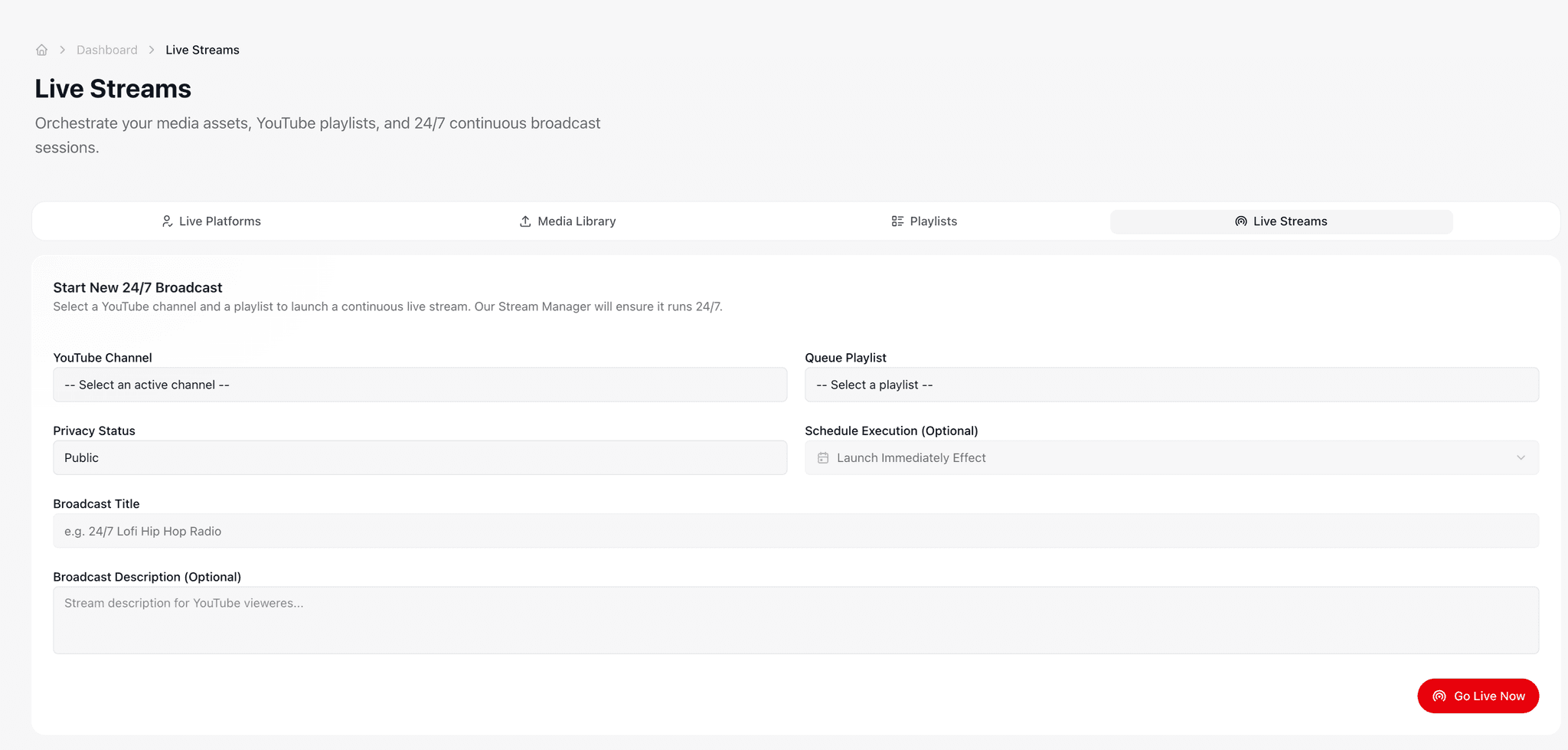
Frequently asked
How many faceless YouTube channels can CodivUpload handle?+
Practically unlimited. Each channel lives in its own profile inside your workspace. Free tier supports 2 profiles, Starter 10, Pro 25, Business 75, Enterprise 250 with per-extra pricing. Most network operators run 5-30 channels on Pro or Business.
Why do faceless channels need BYOP?+
YouTube's shared 10K unit/day quota is enough for ~6 video uploads across all CodivUpload free-tier users globally. A single faceless channel publishing 3 Shorts/day burns through enough quota to throttle other tenants. With BYOP, each channel has its own private 10K unit/day allowance — supporting 60+ Shorts/day on that channel without affecting anyone else.
Can I cross-post my Shorts to TikTok and Instagram Reels?+
Yes — single API call with platforms=["youtube", "tiktok", "instagram"]. The same vertical 9:16 source video works on all three. CodivUpload publishes in parallel and reports per-platform status. Use platform-specific overrides (instagram_share_to_feed, tiktok_privacy_level, etc.) to customize each network.
Is this against YouTube's terms?+
CodivUpload uses YouTube's official Data API v3 — the same API Buffer, Hootsuite, and TubeBuddy use. As long as your content itself follows YouTube's policies (no AI-generated misinformation, no synthetic media without disclosure, no spam farms), the upload mechanism is fully compliant. Always set youtube_contains_synthetic_media=true if you generate footage of real people.
Can I run this entirely from the dashboard, no code?+
Yes. The visual dashboard handles connect, bulk upload, scheduling, monitoring, and analytics. The API and MCP are optional — useful when you want to integrate with a clipping pipeline (Klap, Opus) or fully automate from a CMS. Most network operators start with the dashboard and graduate to scripts as their content velocity grows.
What's the bottleneck at scale?+
YouTube's per-channel quota and content review timing. With BYOP each channel gets a fresh 10K/day. Audit trails are stored in CodivUpload's destinations table — every upload is logged with status, post URL, and any error message from YouTube's API.
Run your channel network from one backend
Free plan covers 10 uploads/month. Pro adds BYOP for dedicated YouTube quota per channel.
See pricing