The social media dashboard that also has an API
Drag-drop content calendar, per-platform preview, AI assistant, team workspaces — same depth as Buffer or Later. Plus a REST API and MCP server underneath, so you never outgrow the tool. Free plan, 10+ platforms, no credit card required.
Most social media tools force a choice: a UI scheduler with no API (Buffer, Hootsuite, Later, SocialBee) or an API-only service with no dashboard (Ayrshare, Upload-Post, Post-Bridge). CodivUpload covers both paths — and adds an MCP server so AI agents like Claude and ChatGPT can post on your behalf. Pick the interface that fits each workflow.
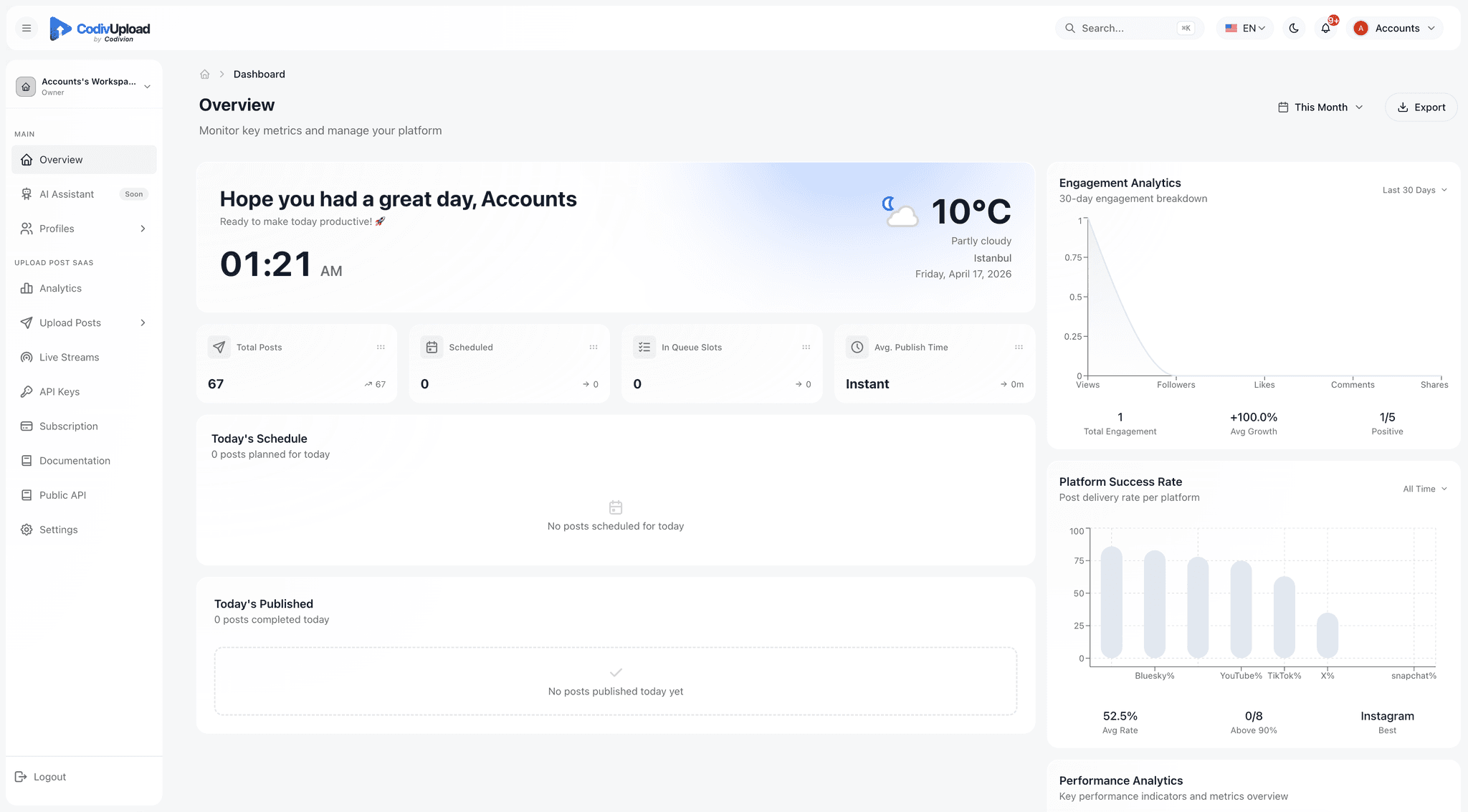
CodivUpload dashboard — the primary interface used by content teams and agencies
What the dashboard covers
Every feature listed below is available in the visual dashboard — no code required. The same operations are also exposed via REST API and MCP for teams that want to automate.
Drag-drop content calendar
Plan a month of content visually. Drag posts between days, switch between monthly, weekly, and daily views, color-code by campaign or client. Backed by a queue system that auto-fills empty slots from your time-slot configuration.
Per-platform live preview
See how your post will appear on TikTok, Instagram Reels, YouTube Shorts, X, LinkedIn, and 6 more — before you schedule. Catch character-limit overruns, aspect-ratio mismatches, and hashtag formatting issues without leaving the composer.
AI assistant — captions, hashtags, repurpose
Generate platform-optimized captions in 10 languages and 6 tones. Repurpose long-form blog posts into short-form social copy in one click. Get 30 hashtag suggestions grouped by reach (high, medium, niche).
Team workspaces with role-based access
Invite teammates as Admin, Editor, or Viewer. Editors can schedule but not approve; Viewers see analytics but can't post. Each workspace has its own profiles, posts, and quota — perfect for managing client accounts cleanly.
Cross-platform analytics + best-time-to-post
Engagement, reach, and growth charts unified across all 10+ platforms. The best-time-to-post analyzer reads your last 90 days of data per account and recommends the optimal posting window for each platform.
Bulk upload from URL or file
Drop 50 videos into the dashboard, set the schedule cadence, and walk away. The queue picks them up at the configured time slots. Or pass an Airtable/Google Sheet of pre-written content via API and let the dashboard render the same calendar view.
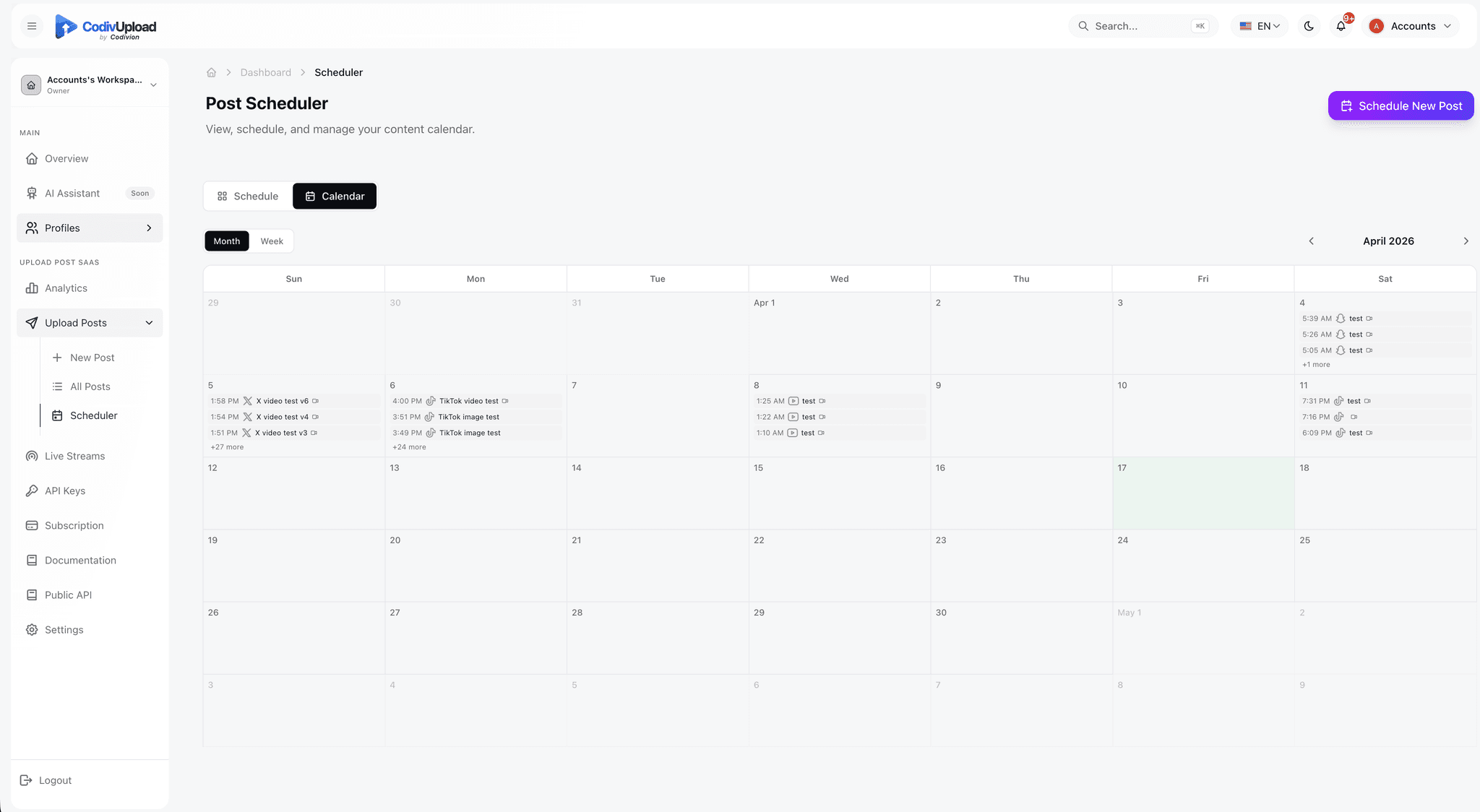
A content calendar that doubles as a queue
Plan posts visually across monthly, weekly, or daily views. Drag between days to reschedule. Empty time slots auto-fill from your queue configuration so you never run out of content during a busy week. Color-code by campaign, client, or content type. Every post on the calendar can also be inspected, edited, or duplicated via REST API or MCP — same data, different interface.
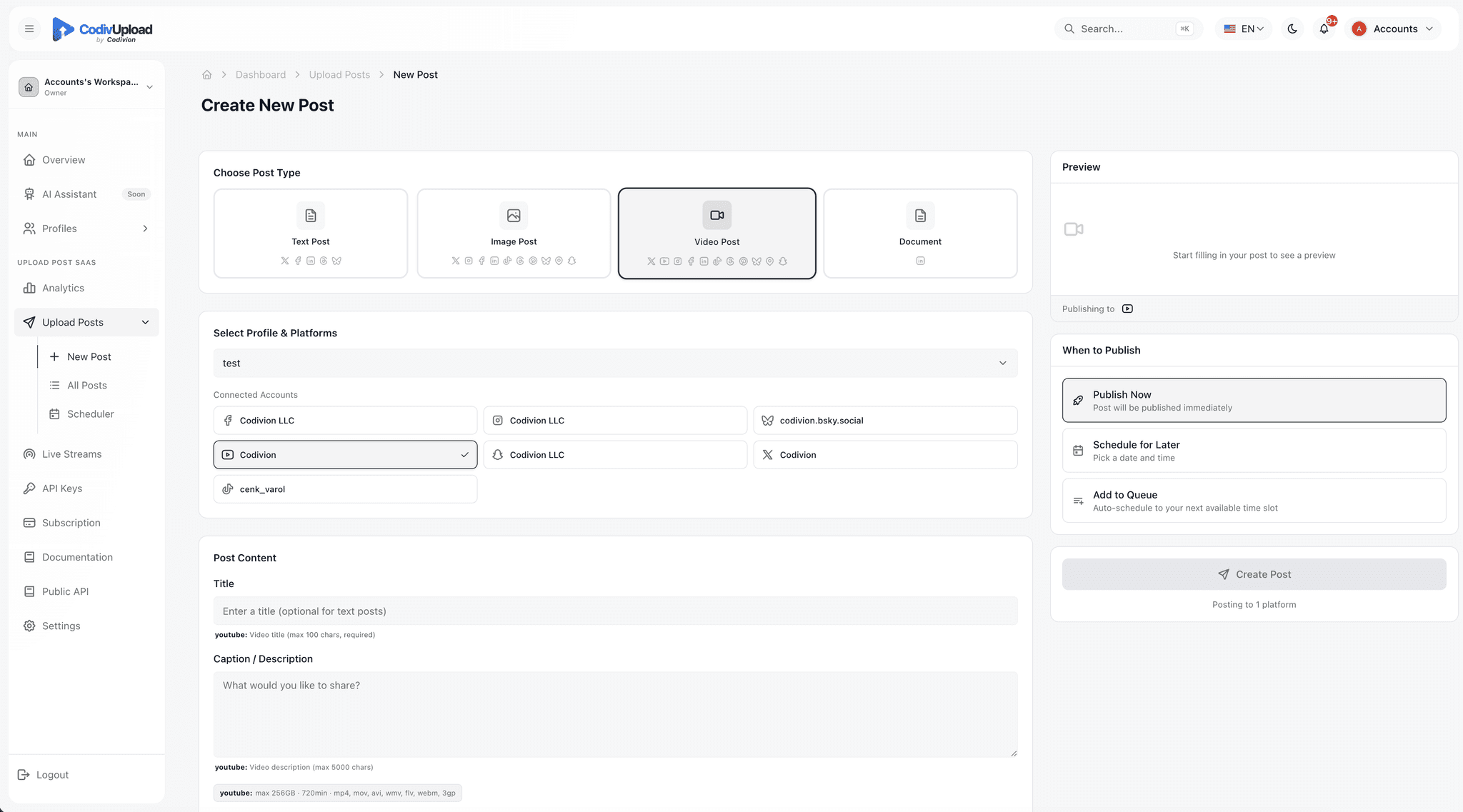
Write once, preview every platform
The composer shows you live previews of how your post will render on TikTok, Instagram, YouTube, X, LinkedIn, Threads, and the rest — before you schedule. Catch character-limit overruns, aspect-ratio mismatches, or broken hashtag formatting in one place. Use platform-specific overrides to customize each network without making separate posts: a longer caption on LinkedIn, a different cover on Instagram, reply-control settings on X.
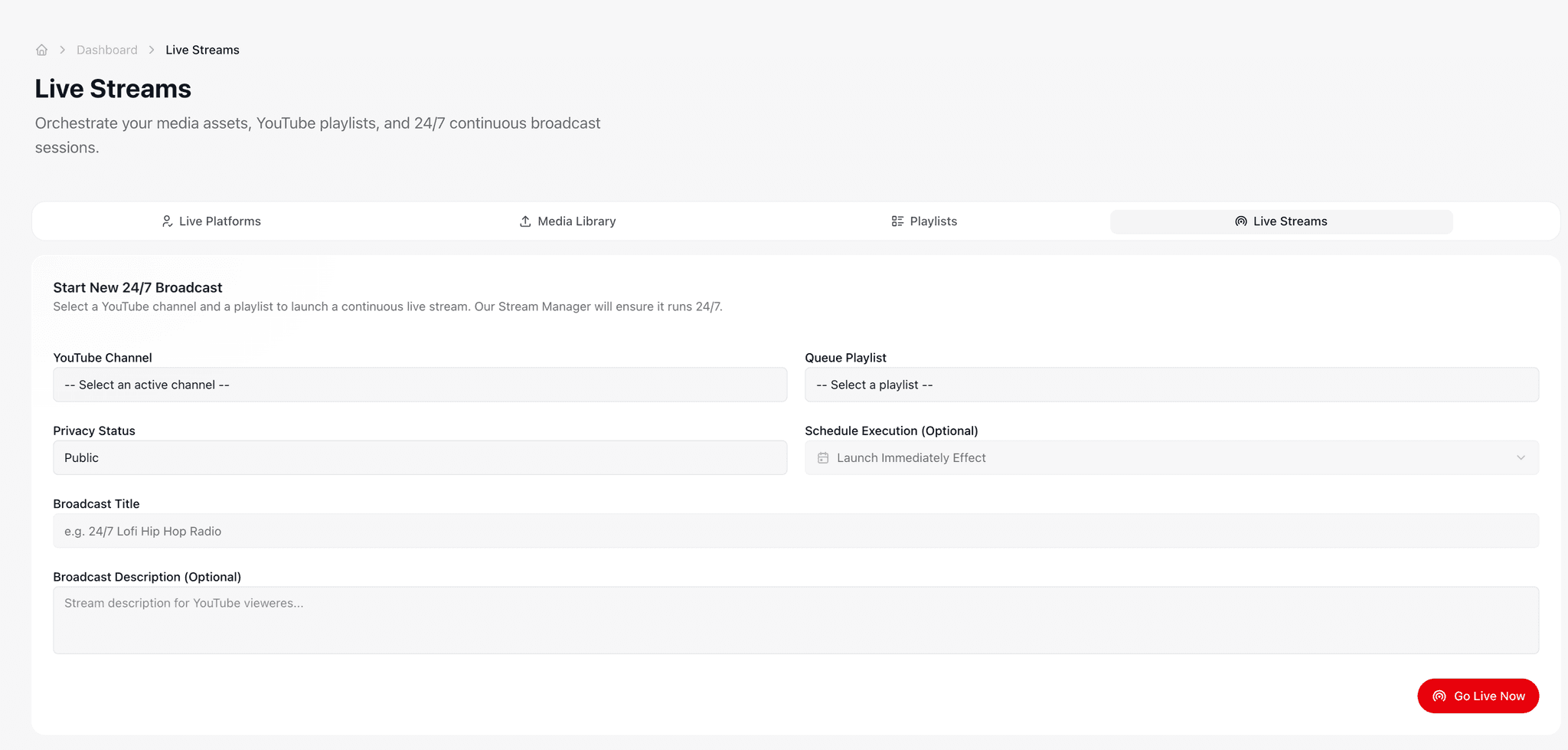
Manage 24/7 streams alongside your scheduled posts
Configure 24/7 YouTube live streams from the same dashboard you use for posts. Upload your playlist, hit start, watch the live status update in real time. Behind the scenes, dedicated FFmpeg worker nodes push the stream to YouTube with copy-mode encoding and automatic reconnection on RTMP drops — so you don't need to operate a VPS or babysit OBS.
Who this fits
The dashboard is the primary interface for non-developer users — but the underlying API means a developer can pick up where the UI leaves off, in the same workspace.
Marketing managers and content teams
Replace Buffer or Later. Same visual calendar, same drag-drop, same AI assistant — plus access to an API and MCP server when you eventually need them. No need to switch tools as your team grows.
Agencies managing 10-200 client accounts
One workspace per client (or one workspace, many profiles). Whitelabel branded OAuth. Per-client analytics. Role-based access so account managers can't accidentally see other clients' posts.
Solo creators
Free plan: 10 uploads/month, 2 profiles, 10+ platforms, full dashboard, AI captions. No credit card. Plenty for a personal brand or side project.
Hybrid teams (UI users + developers)
Marketing team plans content in the calendar. Engineering team automates the publishing-from-CMS flow with the API. Same workspace, same data, two interfaces.
Three interfaces, one platform
Pick the workflow that fits each task. Mix and match across team members and tools.
Visual dashboard
Drag-drop calendar, per-platform preview, AI assistant. For content teams, agencies, solo creators.
Start with the dashboardREST API + SDKs
Single POST /v1/posts to 10+ platforms. TypeScript and Python SDKs. For developers and SaaS builders.
Read the API guidesMCP for AI agents
npx codivupload-mcp adds CodivUpload to Claude Desktop, Cursor, ChatGPT. For AI engineers.
Set up MCPHow CodivUpload compares
Most tools force a choice between a dashboard and an API. CodivUpload covers both, plus AI agent integration in the same product.
| Tool | Dashboard | REST API | MCP / AI | Live Stream |
|---|---|---|---|---|
| CodivUpload | ||||
| Buffer | — | — | — | |
| Hootsuite | — | — | — | |
| Later | — | — | — | |
| SocialBee | — | — | — | |
| Ayrshare | — | — | — | |
| Upload-Post | — | — | — | |
| Post-Bridge | — | Basic | — |
Frequently asked
Do I need to know how to code to use the dashboard?+
No. The dashboard is a visual interface — connect accounts via OAuth, drag posts onto the calendar, click Schedule. The REST API and MCP server are optional, separate access methods used by developers and AI engineers. Most CodivUpload users never touch the API.
How is the dashboard different from Buffer or Hootsuite?+
The dashboard itself has feature parity (calendar, scheduling, analytics, AI captions) — the differentiator is what's underneath. Buffer and Hootsuite have no public REST API and no MCP server, so if you ever need to automate via code or hook up an AI agent, you have to switch tools. CodivUpload covers the full path from manual UI use to fully autonomous agentic posting.
Can my team use the dashboard while developers use the API?+
Yes — that's the most common pattern. Marketing team schedules posts via the dashboard, engineering team automates content-from-CMS via POST /v1/posts. Both flows hit the same workspace, profiles, and analytics. Posts created by either path show up in the calendar view.
Is the dashboard included on the free plan?+
Yes. Every plan including the free tier ($0/month, 10 uploads/month) includes the full dashboard — calendar, AI assistant, analytics, team workspace, all 10+ platforms. The free plan limits the post quota and number of profiles, not features.
Can I whitelabel the dashboard for my agency?+
The dashboard itself is CodivUpload-branded, but the connect/OAuth flow you send clients through can be whitelabel-branded with your logo and colors (Pro plan and above). Your clients see your brand when they connect their TikTok or Instagram account; you manage everything from your CodivUpload dashboard.
What happens to my scheduled posts if I cancel?+
All scheduled posts continue publishing through the end of your billing period. After that, posts in the queue are paused but not deleted — you can reactivate at any time and pick up where you left off. Your historical data and analytics remain accessible on the free tier.
The dashboard you want, the API you'll want eventually
Free plan: 10 uploads/month across 10+ platforms. Full dashboard. No credit card.
Start free