Your AI Agent. Your Social Media Manager.
Connect Claude Code, Cursor, or any MCP client to CodivUpload. Publish to 10+ platforms, schedule posts, check analytics — all through natural language.
See it in action
A simulated Claude Code session showing real MCP tool calls. Click a tab to switch scenarios.
$ claude
How it works
Three steps from install to publishing.
Configure MCP
Add CodivUpload to your MCP client config with your API key. One JSON block, no SDK needed.
"codivupload": {
  "command": "npx",
  "args": ["codivupload-mcp"],
  "env": { "CODIVUPLOAD_API_KEY": "cdv_..." }
}
Talk to Your Agent
Say "schedule a video to TikTok for tomorrow 9am" and the agent translates to a CodivUpload tool call.
Content Goes Live
The MCP server calls the CodivUpload API. Posts are queued, tokens refreshed, content delivered to all 10+ platforms.
Available MCP tools
Four tools your AI agent can call. Same parameters as the REST API.
publish_posttoolPublish to 1–10+ platforms in one call. Supports per-platform overrides, media attachments, and all API parameters.
schedule_posttoolQueue a post for future delivery. Same parameters as publish_post, plus a required scheduled_date field (UTC ISO 8601).
get_poststoolList recent posts with delivery status, platform breakdown, and timestamps. Filter by status or date range.
list_profilestoolShow all connected social profiles with platform connections, token health, and remaining posting quota.
list_profiles returns this
Live from dashboard — same data your agent sees
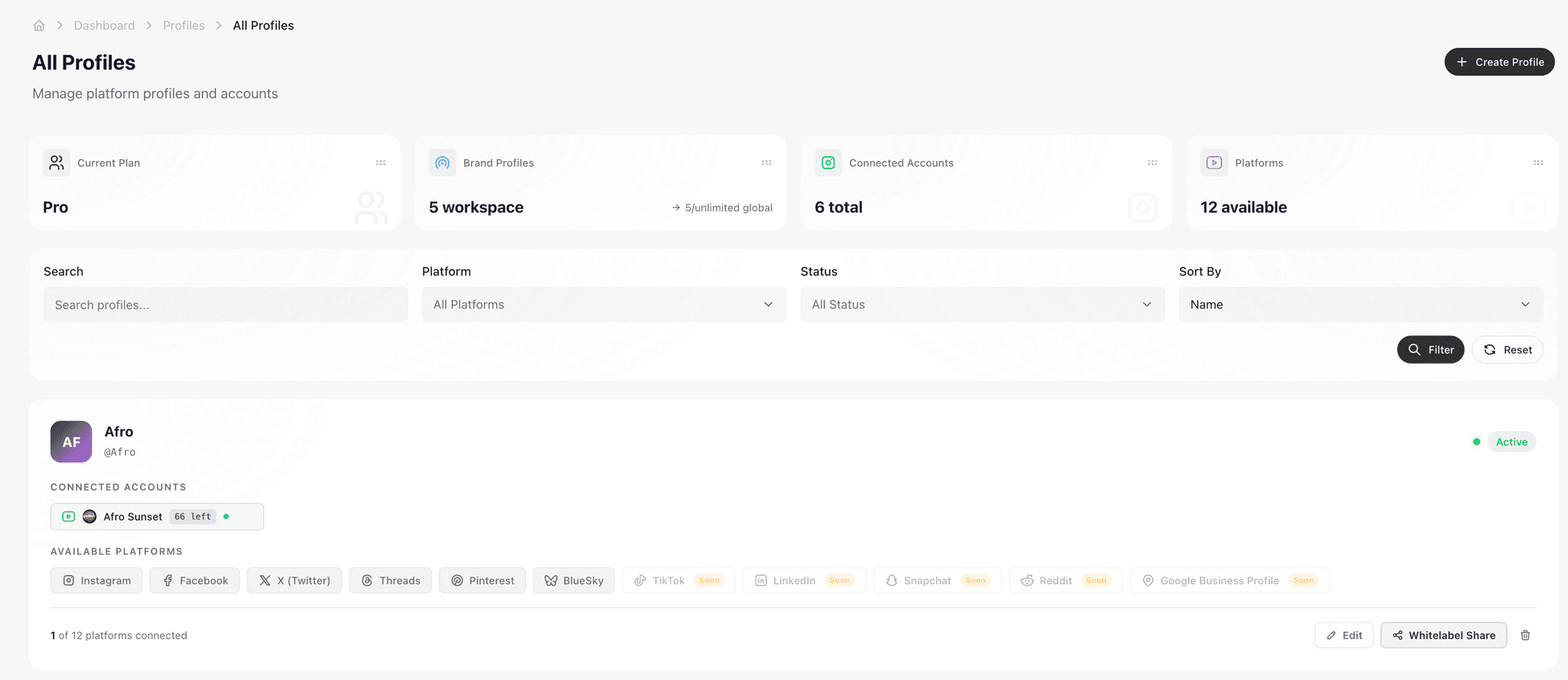
When your agent calls list_profiles, it gets a structured JSON version of this view: each profile name, every connected platform, token expiry, and remaining quota. That's how it knows whether to publish, refresh tokens, or surface a warning before it tries.
Supported clients
Any tool that speaks MCP can connect. These are tested and documented.
Claude Desktop
Anthropic's native desktop app
Claude Code
CLI agent for developers
Cursor
AI-powered code editor
Any MCP client
Open protocol — any compatible tool works
One config block. That's it.
Add this to your Claude Desktop claude_desktop_config.json or any MCP client's config file. Replace the API key with your own from the dashboard.
{
  "mcpServers": {
    "codivupload": {
      "command": "npx",
      "args": ["-y", "codivupload-mcp"],
      "env": {
        "CODIVUPLOAD_API_KEY": "cdv_..."
      }
    }
  }
}What is MCP and why it matters
The plumbing that lets your AI agent actually do things, not just talk about them.
A standardized tool layer
Model Context Protocol (MCP) is an open specification from Anthropic that defines how language models discover and call external tools. Instead of every app shipping its own custom “function calling” layer, MCP gives every model the same wire format: a JSON-RPC handshake, a tool registry, and structured input/output schemas.
Beyond REST APIs
A traditional REST API requires a developer to write client code, parse OpenAPI specs, and wire up auth. With MCP, the AI agent reads the tool catalog at runtime, understands argument shapes from the schema, and decides on its own which tool to call — no glue code, no custom adapters, no per-integration prompt engineering.
Not a chatbot, not a plugin
Chatbots reply with text. Plugins live inside one vendor's walled garden. MCP servers are local processes you run yourself, exposed to any compatible client. CodivUpload's MCP server runs on your machine, holds your API key, and gives whichever model you're using the same set of tools — today Claude, tomorrow the next state-of-the-art agent.
The paradigm shift: instead of you adapting to each social platform's API, your AI agent adapts to your intent. You describe an outcome (“publish this video everywhere except YouTube”) and the agent picks the right tool, fills in the right parameters, and handles the response — including retries, validation errors, and per-platform overrides like TikTok's privacy level or Instagram's media type.
What this actually looks like day to day
Three workflows our heaviest users run every week. None of them required a single line of integration code.
Workflow 1 — “Schedule my new TikTok video for tomorrow at 9am EST”
The agent parses the timezone, converts to UTC, validates that the media file is a vertical MP4 under 287MB, and dispatches a single schedule_post call with scheduled_date set to 2026-04-23T13:00:00Z. Privacy level, content disclosure flags, and commercial-content settings are inferred from your previous TikTok posts. You confirm with one keystroke.
Time saved per post: ~3 minutes of timezone math, file checks, and platform-specific toggles.
Workflow 2 — “Repost my top-performing Instagram post this month to LinkedIn”
The agent calls get_posts filtered to Instagram, sorts by engagement, picks the winner, and reformats it for LinkedIn: hashtags moved into a clean trailing block, caption length checked against LinkedIn's 3,000-character limit, image swapped to a horizontal crop if needed, then queued via publish_post. Cross-platform format adaptation happens inside the conversation — no copy-paste, no second tab.
Time saved per repurpose: ~12 minutes of analytics scrolling and manual reformatting.
Workflow 3 — “Generate a caption for this video and queue it for all platforms”
You drag a video file into Claude. The agent watches the keyframes, drafts three caption variants in your brand voice, lets you pick one, then chains upload_media → schedule_post with platform-specific overrides: shorter text for X, longer text plus CTA for LinkedIn, hashtags cleaned for Threads, alt-text auto-generated for accessibility. AI captioning and scheduling become a single end-to-end flow.
Time saved per multi-platform launch: ~25 minutes of caption rewriting and per-platform tweaking.
Supported MCP clients in detail
CodivUpload's MCP server is a stdio-based Node process — any client that speaks MCP over stdio can connect. These four are tested and documented end to end.
Claude Desktop & Claude Code
Anthropic's reference MCP implementation. Works on Claude Desktop 0.7+ (macOS, Windows, Linux) and Claude Code CLI 1.0+. Config lives in ~/Library/Application Support/Claude/claude_desktop_config.json (macOS) or the equivalent path on other OSes. Claude Code reads .mcp.json from the project root, which makes per-project API keys easy.
claude mcp add codivupload \
  -e CODIVUPLOAD_API_KEY=cdv_... \
  -- npx -y codivupload-mcp
Cursor IDE
Cursor 0.45+ ships first-class MCP support. Configure servers under Settings → MCP, or drop a .cursor/mcp.json in your repo. The IDE will auto-restart the server on config changes — useful when rotating API keys.
{
  "mcpServers": {
    "codivupload": {
      "command": "npx",
      "args": ["-y", "codivupload-mcp"],
      "env": { "CODIVUPLOAD_API_KEY": "cdv_..." }
    }
  }
}
Cline (VS Code extension)
Cline is the most popular open MCP client for VS Code. Add CodivUpload through the MCP Servers tab in the Cline sidebar — same JSON shape as Cursor and Claude Desktop. Works with Anthropic, OpenAI, and any model Cline supports as a backend.
# In Cline Settings -> MCP Servers
{
  "command": "npx",
  "args": ["-y", "codivupload-mcp"],
  "env": { "CODIVUPLOAD_API_KEY": "cdv_..." }
}
Any MCP-compatible client
Continue.dev, Zed, Windsurf, Sourcegraph Cody, and a growing list of agents all read the same MCP spec. If your client supports stdio MCP servers and lets you set environment variables, CodivUpload works — no special integration required. Run the server manually with npx codivupload-mcp and connect over stdio.
CODIVUPLOAD_API_KEY=cdv_... \
npx -y codivupload-mcpCommon questions about MCP integration
The questions that come up most in our developer Discord. If yours isn't here, the docs cover the rest.
Related
AI Skills for Claude, Antigravity, Cursor →
Markdown skill packs that teach your agent platform-specific rules. Pair with MCP for runtime tools.
Free Social Media API →
The same tools, but as raw REST endpoints. 30 free uploads/month, no card required.
Visual Dashboard →
Prefer a UI? The dashboard hits the same backend — switch interfaces mid-workflow.
How-to: Connect Claude Desktop via MCP →
Step-by-step walkthrough with screenshots and the exact config block.
What else MCP unlocks
Scheduling is the obvious win. The interesting workflows come from chaining tools and treating the agent as a teammate.
Bulk operations
Hand the agent a CSV of 200 posts with platform tags, captions, media URLs, and dates. It loops through, validates each row, dispatches schedule_post calls, and reports back with successes, failures, and quota remaining. No bulk-import UI required — the agent is the bulk-import UI.
Cross-platform analytics queries
“Which platform gave me the highest engagement rate last month, and what did the top three posts have in common?” The agent calls get_posts with a date filter, aggregates across platforms, runs the qualitative analysis itself, and gives you a one-paragraph answer instead of a dashboard you have to read.
Workspace management
Audit token health, find disconnected platforms, list scheduled posts that haven't fired, and pull a quota usage report — all through natural language, all without opening the dashboard. Useful for agencies running 20+ client workspaces who want a daily standup summary delivered into their chat client.
Team coordination workflows
Pair the MCP server with another MCP server (Linear, Notion, Slack) and the agent can move work across systems: pull the next approved caption from Notion, schedule it on the right channels, post a confirmation to Slack, and update the Linear ticket to “Shipped.” Multi-tool orchestration without writing a Zapier flow.
The mental model: stop thinking of CodivUpload as a SaaS dashboard with an API stuck on the side. With MCP, it's a set of capabilities your AI agent can compose with whatever else you're working on. The dashboard becomes optional.
Ready?
Connect Your AI Agent
Get an API key, add the MCP config, and start publishing to 10+ platforms through natural language. Free plan included.
Get API Key — Start Free