Schedule 50 videos at once across 10+ platforms
Drop a folder of videos into the dashboard or POST an array of URLs to the API. CodivUpload uploads each one in parallel, fans out to YouTube, TikTok, Instagram Reels, and 8 more platforms, and respects every per-platform rate limit. Set the schedule once; the queue runs indefinitely.
Bulk upload — discipline_daily
2 of 6 uploaded · 4 queued
 3 platforms
- ep01-intro.mp484 MBUploadedYouTube + TikTok + Reels
- ep02-deepwork.mp492 MBUploadedYouTube + TikTok + Reels
- ep03-pomodoro.mp478 MBUploadingYouTube + TikTok + Reels
- ep04-batching.mp488 MBQueuedYouTube + TikTok + Reels
- ep05-mornings.mp481 MBQueuedYouTube + TikTok + Reels
- ep06-stoicism.mp475 MBQueuedYouTube + TikTok + Reels
Mock view of bulk upload — 6 videos fanning out to YouTube, TikTok, and Instagram Reels
50+
videos per batch
5 GB
max file size
11
platforms per upload
60+
Shorts/day per channel (BYOP)
How bulk upload actually works
Bulk upload is a queue, not a one-shot batch. Drop the videos in once, then the worker picks them up at your configured slots forever — until the queue empties or you pause it.
Drop a folder of videos, walk away
Drag 50 videos into the dashboard or pass an array of URLs to POST /v1/posts. CodivUpload uploads them in parallel (respecting per-platform rate limits), assigns each to a configured time slot, and runs the queue indefinitely. No script-and-cron setup; the worker handles pacing.
One time-slot config, many videos
Configure your queue once: every 3 hours, every 12 hours, daily at 09:00, or custom slot patterns per day-of-week. New videos auto-fill the next empty slot. Switch from manual scheduling to bulk-fill mid-month without losing visibility into when each post will go live.
Cross-platform fan-out per video
Each video in the bulk batch can target multiple platforms in one shot. Same vertical 9:16 source publishes to YouTube Shorts, Instagram Reels, and TikTok with platform-specific overrides — covers (instagram_cover_url), tags (youtube_tags), privacy (tiktok_privacy_level) — all in the same payload.
Resumable uploads up to 5GB
Direct multipart upload handles files up to 100MB. For larger files (full-length courses, masterclass episodes), use the presigned 3-step upload flow that goes browser-direct to CodivUpload's CDN and returns a media URL ready for POST /v1/posts.
See every queued video on the calendar
Bulk upload doesn't just dump videos into a black box. Every queued post lands on the dashboard calendar at its scheduled time. Drag to reschedule, click to inspect status, swap source media if you change your mind. The same view works for one-off posts and 50-video batches.
Dashboard tour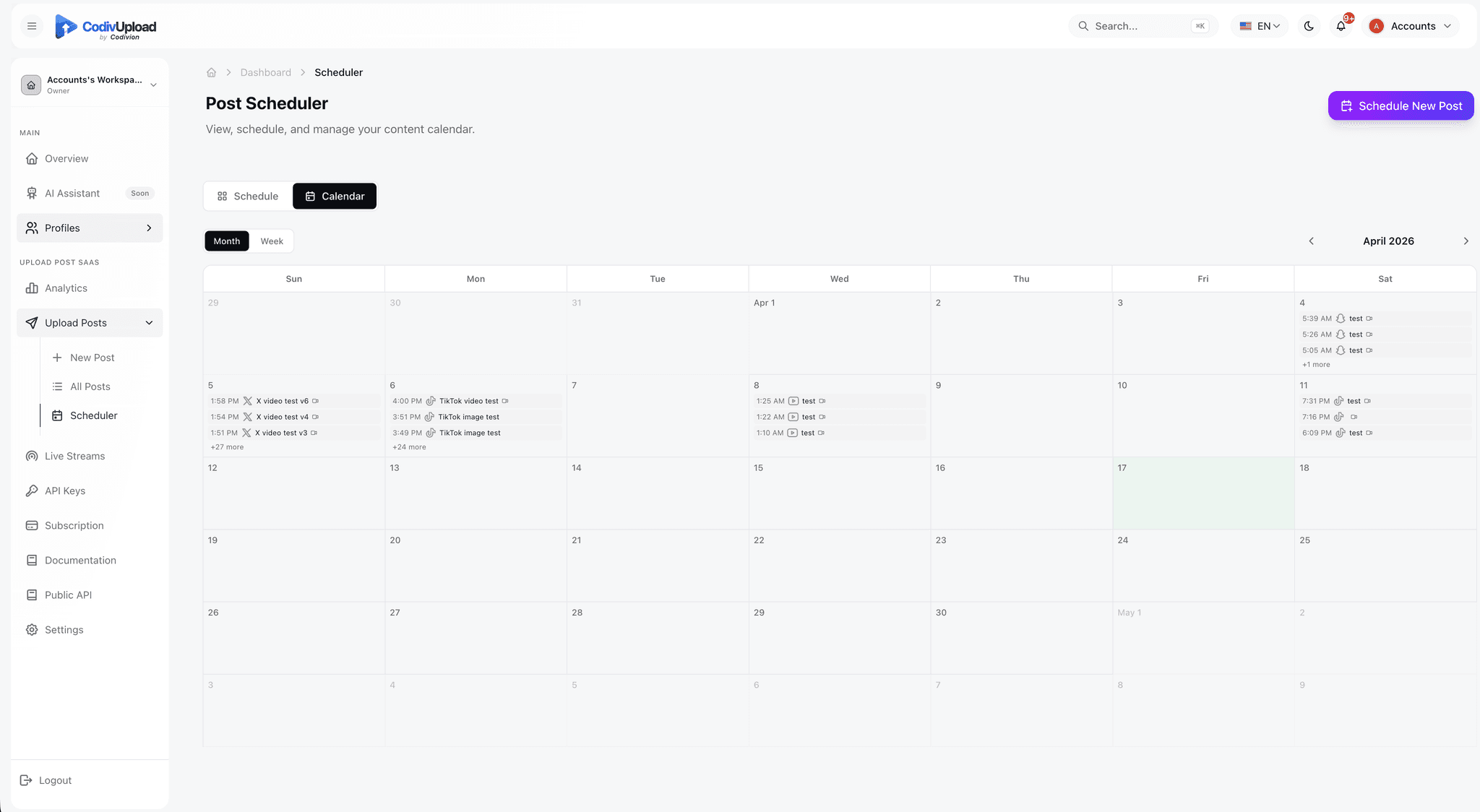
Frequently asked
What's the actual upload limit per batch?+
There's no hard cap on batch size — you can submit 100, 500, or 1,000 video URLs in sequence. Practical limits come from the destination platforms: YouTube's 10K unit/day quota (or your BYOP project's 10K), TikTok's 100 daily uploads per account, Instagram's 200 calls/hour per Page. CodivUpload's queue paces requests to stay within each platform's limits without you managing it.
Can I customize the schedule per video?+
Yes. Each POST /v1/posts call accepts a scheduled_date in ISO 8601 UTC. Or pass schedule_best_time=true and CodivUpload picks the optimal hour from each connected account's last 90 days of analytics. Or omit both fields and the post goes out immediately. Mix and match across your batch.
Does this work with the dashboard or only the API?+
Both. The dashboard's bulk-upload screen accepts a CSV or a folder drag, generates one queued post per row/file, and shows the same status grid as the API. The REST API exposes the same operations as POST /v1/posts calls. Most teams start in the dashboard and switch to the API when they want to wire a CMS/Airtable/Make pipeline into the upload flow.
What happens when a single platform fails inside a multi-platform batch?+
The post lifecycle becomes partially_failed. Successful destinations stay published (they're not rolled back), failed destinations get a status=failed row with error_message. Use POST /v1/posts/:id/retry-failed to re-queue only the failed destinations after fixing the root cause — no duplicate posts on the platforms that already succeeded.
Can I throttle the bulk upload speed?+
Pass a custom scheduled_date with progressive offsets (e.g. each video 15 minutes apart) to spread the load. The queue worker also auto-throttles per platform's rate limit — even if you submit 100 calls in 1 second, the worker spaces actual platform API calls to stay polite.
How are large videos uploaded?+
For files >100MB, use the 3-step presigned upload flow: POST /v1/upload-media/presign returns a signed URL, you PUT the file directly to the URL (browser→CDN, no proxy through CodivUpload's servers), then POST /v1/upload-media/finalize marks the upload complete. The returned CDN URL is then ready for POST /v1/posts.
Stop uploading one video at a time
Drop the folder, set the queue cadence, walk away. Free plan covers 10 uploads/month.
See pricing