Run a 24/7 YouTube channel without keeping a computer on.
Upload your video once. CodivUpload broadcasts it to YouTube non-stop on dedicated cloud nodes — at the exact quality you uploaded. Lo-fi channels, news loops, surveillance feeds, and crypto tickers all run on the same infrastructure that powers some of the largest 24/7 channels online.
- Zero frame drops, zero quality loss
- 3 Gbps dedicated bandwidth per node
- Your laptop stays off — we run it in the cloud
- Manage from a dashboard or the REST API
Real product, real screen
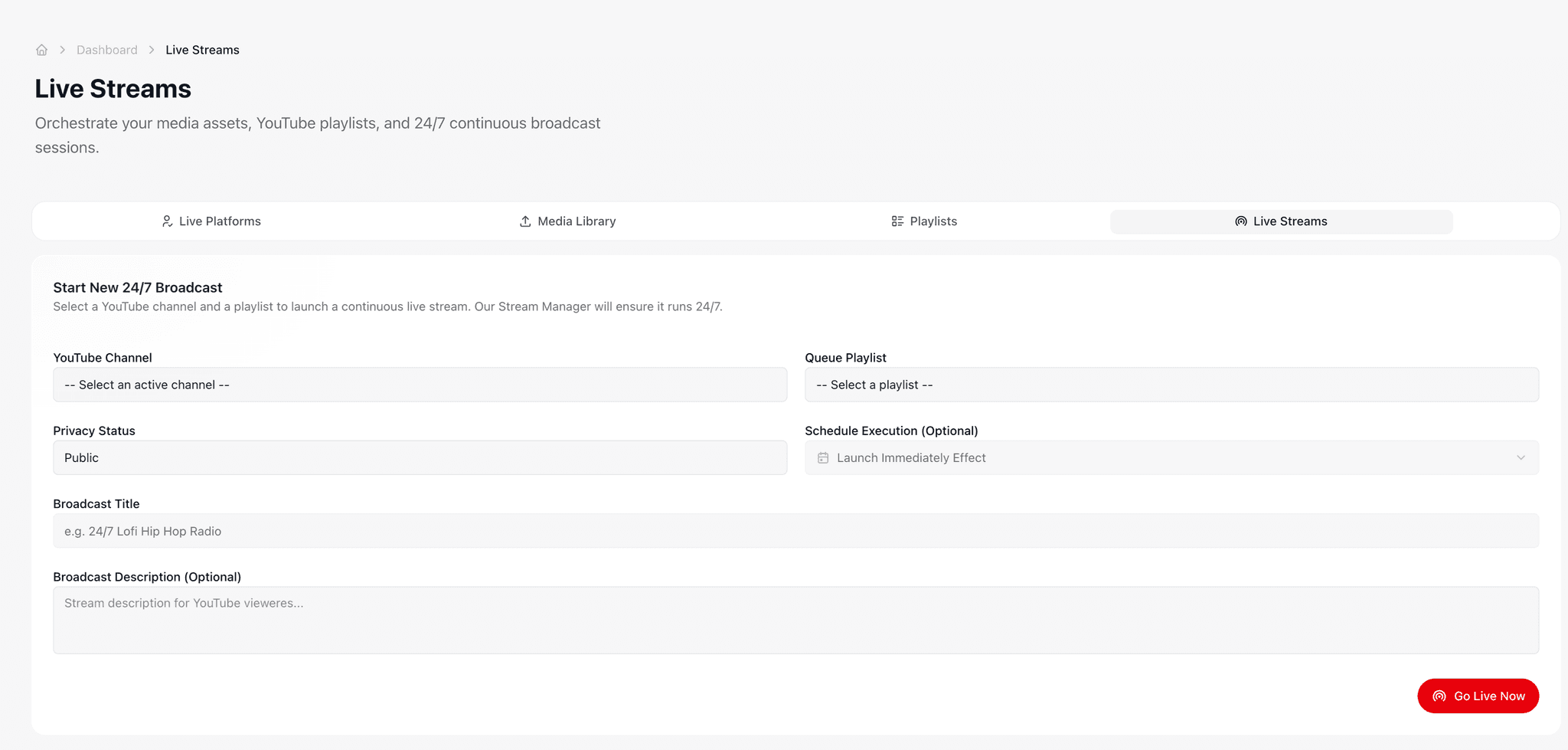
Live stream control panel — start, pause, monitor uptime, swap source media in real time
Why creators run 24/7 YouTube streams
Continuous broadcasting is one of the highest-leverage things you can do on YouTube right now. Three reasons it works.
YouTube rewards watch-time
A channel that broadcasts continuously accumulates watch-hours faster than any short-form strategy. Lo-fi, ambient, and ticker channels regularly clear monetization thresholds within weeks.
Always-on means always-discoverable
A live stream sits at the top of search results and the YouTube Live category around the clock. Viewers find you while you sleep — and the algorithm keeps recommending the channel that never goes offline.
Built once, monetized forever
Drop a video file in once and turn it into a permanent revenue stream. No daily uploads, no editing schedule, no burnout — the loop runs while you focus on what's next.
How it works
From sign-up to a live broadcast in under two minutes.
Connect your YouTube channel
OAuth your channel in seconds. Sub-channels and brand accounts work too. No copy-pasting RTMP keys, no separate streaming software to install.
Upload media or build a playlist
Drop in a video file, paste a public URL, or stitch several clips into a playlist. Schedule the broadcast to start now or any time in the future.
We keep it live, you walk away
A dedicated streaming node is provisioned for your account and the broadcast runs end-to-end on our infrastructure. Close your laptop, go to sleep, take a flight — the stream stays on.
Everything you need in one dashboard
Media library, playlists, stream control, and live performance — no separate tools, no glue scripts, no terminal.

Channel manager
Connect multiple YouTube channels and route different streams to each. Brand accounts, sub-channels, and topic-specific channels are all supported.
Media library
Upload videos, paste public URLs, and organize them in folders. Reuse the same files across multiple streams or playlists with one click.
Smart playlists
Stitch clips into a continuous playlist that loops, shuffles, or rotates on a schedule. Perfect for podcast highlights, music mixes, and IPTV blocks.
Scheduling
Start now, in an hour, or next month. Stack streams back-to-back so the channel never goes dark — even when you're traveling or asleep.
What you actually get
Every plan includes the same dedicated infrastructure. The only thing that changes between tiers is how many streams you can run at once.
Zero quality loss
Your video reaches YouTube bit-for-bit identical to the file you uploaded. No re-encoding artifacts, no resolution drops, no audio sync issues — what you upload is exactly what your viewers watch.
3 Gbps per node
Industrial-grade bandwidth allocated to every dedicated worker. Comfortably handles multiple 4K streams in parallel without buffering, throttling, or congestion at peak hours.
Self-healing streams
If anything hiccups — a network blip, a corrupted segment, a YouTube ingest reset — we detect it within seconds and bring the broadcast back online automatically. You don't need to babysit anything.
Live performance dashboard
Watch CPU, memory, network, and per-stream health in real time. See exactly how each broadcast is performing without leaving the dashboard or piecing together logs.
Independent streams
Every broadcast runs in its own sandboxed environment. One stuck stream never affects the others — your news loop stays online even if a different feed has trouble.
Schedule anything
Start a broadcast now, in an hour, or next Tuesday at 3 AM. Stack streams back-to-back, rotate playlists, or auto-replace media — all configurable from the dashboard or API.
Who broadcasts 24/7 with us
Six categories of channels that consistently grow on always-on broadcasting. If your idea fits one of these molds, it will run great here.
Lo-fi & music channels
Chill beats, study rooms, ambient soundscapes. Upload a 6-hour mix once, loop it forever, and let the algorithm do the rest. The most reliable category for passive watch-hours.
News, sports & IPTV relays
Rebroadcast a feed continuously to YouTube. Highlights reels on loop, sports recaps between live events, and 24/7 news desks — all running on infrastructure that doesn't blink.
Surveillance & camera feeds
Push IP cameras, drones, or webcam feeds to a private or unlisted YouTube stream. Remote monitoring for warehouses, retail, sanctuaries, and control rooms — without paying for a separate streaming product.
Crypto & finance tickers
Composite live market data over a video background and broadcast non-stop. Crypto price feeds, stock tickers, and market dashboards thrive on always-on YouTube channels.
Nature & ambient cams
Wildlife sanctuaries, beach cams, mountain trails, aquarium feeds. Persistent streams build a loyal audience that returns every day — and YouTube's recommendation engine loves long sessions.
Education & tutorial loops
Lecture series, language drills, coding tutorials, certification prep. Loop educational content for passive viewership and let learners drop in and out at any hour of the day.
Why not just stream from your laptop or a VPS?
People try OBS on a home computer or rent a generic Linux box first. Both work for an evening — neither survives a real 24/7 channel.
 CodivUpload
Laptop streaming kills your battery, your CPU, and eventually your channel — one Windows update at 3 AM and the broadcast is over.
Home Wi-Fi can't sustain 4K upload reliably. ISPs throttle continuous outbound traffic.
A bare VPS works until something crashes. Then you discover there's no auto-restart, no metrics, no isolation.
Pricing
Stream concurrency scales with your plan.
Every paid plan from Pro upward includes 24/7 live streaming. Need more concurrent broadcasts? Add extra streams at a flat per-stream rate — no plan upgrade required.
Pro
$40/mo
Business
$140/mo
Enterprise
$400/mo
Ready to broadcast 24/7?
Pro plan starts at $40/mo with 2 concurrent streams included. No setup fees, cancel anytime.
Frequently asked questions
Everything our most active streamers ask before signing up.